Naar inhoud

Winkelwagen

Je winkelwagen is leeg

Doorgaan met winkelen

How do I adjust the settings on my Aduro pellet stove?

Difficulty level: Easy

NB: Any adjustment of the settings is on your own responsibility.

To adjust the settings on Aduro pellet stoves, you can use the stove’s control panel or a remote control depending on which type of stove you have.

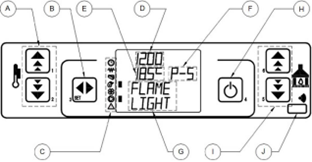
Aduro P1 and P4 – Control panel on stove:

A. Temperature setting (buttons 1 and 2)
B. Enter/SET (button 3)
C. Indicators for single components
D. Clock display
E. Room temperature display
F. Modes of operation
G. Current status information
H. ON/OFF and Exit (button 4)
I. Operation mode setting (buttons 5 and 6)
J. Remote control receiver Difficulty level: Easy

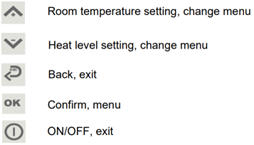
Aduro P5 series – Remote control:

Adjusting heat level and set temperature

How the temperature control is adjusted depends on the stove type. The stoves will adjust towards the setting that was changed last. So, if a change from room temperature to heat level is required, click the heat level adjustment buttons and click SET/OK. 

Aduro P1 series and P4:

  • Heat level: can be changed by pressing button A2 and A1. You can now select heat level by pressing 'SET'. 
  • Desired room temperature: can be adjusted by pressing A2 and A1. You can now select the temperature by pressing 'SET'.

Aduro P5 series:

  • Heat level: is accessed by pressing​​​​​​​ the button 'down arrow' from the main screen. Pressing buttons 'up arrow' and 'down arrow' will then adjust the power level up and down. Select the desired heat level by pressing 'OK'. 
  • Desired room temperature: is accessed by pressing​​​​​​​ the button 'up arrow' from the main screen. Pressing buttons 'up arrow' and 'down arrow' will then adjust the temperature up and down. Select the desired temperature by pressing 'OK'.​​​​​​​

Example of changing settings - language:

Multiple settings can be changed by the user, from the control panel / remote. The available settings may differ depending on the stove type. An example of how to change the language is shown:

Aduro P1 series and P4:

Access the menu from the main screen by pressing​​​​​​​ 'SET'. Scroll between the menus by using the buttons A2 and A1. Scroll until the menu 03 “Select Language” appears, press​​​​​​​ 'SET' to enter.

Scroll the available languages by pressing​​​​​​​ A1​​​​​​2 and A1. The desired language is set as soon as the menu is exited – press​​​​​​​ H to exit a menu. Press​ H​​​​​ to exit the menu list, to return to the main screen.

Aduro P5 series:

Access the menu from the main screen by pressing​​​​​​​ 'OK'. Scroll between the menus by using the buttons​​​​​​​ 'up arrow' and 'down arrow'. Scroll to the menu “Select Language” and press​​​​​​​ 'SET'. Scroll the available languages by pressing 'up arrow' and 'down arrow'. Select the language by pressing 'OK' or 'back'. Exit to the main screen by pressing 'OK' or 'back'.

Did you not find, what you were searching for?

Buy spare parts for your stove

Buy spare parts

Submit claim

Fill in claim form

Compare models

You can compare up to 3 products at a time

Compare