
Skip to content

Cart

Your cart is empty

Continue shopping

How do I resolve Wi-Fi connection issues on my hybrid or pellet stove? (Android)
Difficulty level: Easy
Time consumption: 10 minutes

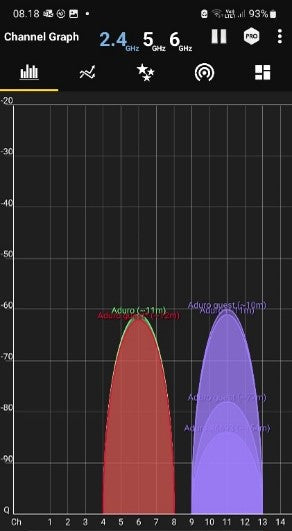
If you have an Android phone/tablet and are having trouble connecting your stove to your local network, you can use the free WiFi analyzer app to check if there are other devices on the 2.4GHz network that are interfering:

  1. Download the WiFi analyzer from the Google Play Store: WiFi Analyzer - Apps on Google Play
  2. Open the WiFi Analyzer App:
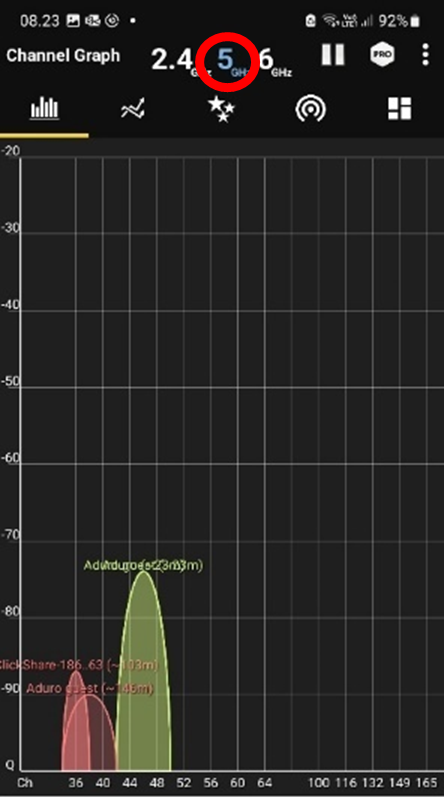
  3. Now you can select between 2.4 Ghz & 5 Ghz networks to see the active devices. See pictures below.

NOTE: If many Wi-Fi devices are present, it might be favourable to turn off some of the devices when connecting the router to the stove, as signals on the same channels can interfere. In many cases channels can be changed by power restarting a devic

Devices on 2.4 Ghz

Devices on 5 Ghz

Did you not find, what you were searching for?

Buy spare parts for your stove

Buy spare parts

Submit claim

Fill in claim form

Compare models

You can compare up to 3 products at a time

Compare